Commercial WiFi Planning for Better Business
A dropped video call during a client meeting, a point-of-sale terminal that stalls at the counter, or a patio where guests lose the network are not minor annoyances. They can affect revenue, productivity, and the way customers view your business. Effective commercial wifi planning prevents those everyday problems by designing coverage around the way your team, customers, and equipment actually use the space.
For a small office, restaurant, showroom, medical practice, or retail location, Wi-Fi is no longer an extra convenience. It supports payments, cloud applications, security cameras, music systems, guest access, tablets, smart displays, and staff communication. A professionally designed network brings all of those demands together without turning your business into a tangle of visible hardware, unreliable extenders, and repeated troubleshooting.
Commercial WiFi Planning Starts With the Space
A floor plan tells part of the story. It can show square footage, rooms, walls, and the likely path for concealed wiring. But planning a dependable business network also means looking at how the space behaves.
Concrete block walls, metal framing, elevator shafts, large coolers, mirrors, shelving, and commercial kitchen equipment can all interfere with wireless signals. An open lobby may need only one carefully placed access point, while a similar-size office divided by dense walls may require several. Outdoor seating, covered entryways, and detached work areas bring their own challenges, especially in Florida weather.
This is why choosing equipment based on a square-footage number on the box rarely delivers the result a business expects. Wi-Fi coverage is not just about reaching every corner. It is about providing a usable, consistent connection where people need it most.
A proper site evaluation identifies where internet service enters the building, where network equipment can be neatly housed, and where hardwired access points should be located. It also considers power availability, cable paths, existing AV equipment, cameras, and any areas that need guest connectivity. The goal is a clean installation that performs well without distracting from the appearance of your business.
Coverage and Capacity Are Different Problems
Many businesses think they have a coverage problem when the real issue is capacity. A single access point may show a strong signal across an entire suite, yet slow down when 25 employees join a video meeting or when a busy waiting room fills with guests.
Coverage asks, “Can a device see the network?” Capacity asks, “Can the network serve everyone using it at the same time?” Both matter.
A restaurant may need reliable service for point-of-sale tablets, handheld ordering devices, kitchen displays, office computers, music streaming, and a separate guest network. A professional office may need stable video conferencing and secure cloud access more than public Wi-Fi. A retail store may rely on inventory scanners, payment terminals, digital signage, and cameras. Each situation calls for a different network layout and different priorities.
Planning for the number of users, connected devices, and high-bandwidth tasks helps prevent the frustrating pattern of a network that seems fine in the morning but struggles during the busiest part of the day.
Build the Network on a Wired Foundation
Wireless access points still benefit from wired connections. In most commercial settings, running structured Ethernet cable to each access point is the right long-term approach. This gives every access point a direct path back to the network, rather than asking one wireless device to relay traffic through another.
Wireless mesh systems can be useful where running cable is impossible or where a temporary extension is needed. They are not automatically the best choice for every business, however. Each wireless hop can reduce available performance, and placement becomes more sensitive. For a business that depends on reliable operations, wired backhaul provides stronger consistency and makes future expansion much easier.
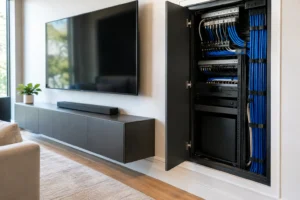
A well-planned network also includes the equipment behind the scenes: a business-grade router or gateway, managed network switch, properly sized internet service, battery backup where appropriate, and organized cabling. These pieces may sit out of sight in a rack, cabinet, or utility area, but they are central to a dependable result.
Professional installation keeps this infrastructure orderly. Cables can be routed discreetly, labeled clearly, and positioned for service access without taking away from the polished look of a reception area, showroom, restaurant, or office.
Separate Guests, Staff, and Critical Devices
Putting every device on one Wi-Fi password is simple at first, but it is not a good business strategy. Commercial network planning should separate traffic based on what each device needs to do.
Staff devices may need access to printers, shared files, and business applications. Guest devices should receive internet access without visibility into internal systems. Security cameras, smart TVs, audio equipment, access control, and point-of-sale hardware may also need their own protected network segments.
This approach improves security and makes problems easier to isolate. If a guest device is consuming bandwidth, it should not interfere with payment processing or an office video call. If an older smart device has trouble connecting, it should not expose critical business systems.
Network security also involves strong administrator credentials, current firmware, appropriate firewall settings, and controlled remote access. The exact level of protection depends on the business. A boutique shop and a medical office face different risks and compliance considerations. The point is to design the network intentionally instead of treating security as an afterthought.
Guest Wi-Fi Should Feel Easy, Not Risky
Guest Wi-Fi can be a valuable part of the customer experience. It can keep visitors comfortable in a waiting area, help diners stay connected, and support events in a venue or showroom. It can also create unnecessary headaches if it is poorly managed.
A separate guest network should have clear access settings and reasonable bandwidth controls. That allows customers to browse, message, and work without allowing a few heavy users to slow down the systems your staff depends on. For some businesses, a simple password is appropriate. For others, a branded sign-in page or time-limited access may make more sense.
The best choice depends on the setting, the customer experience you want to provide, and how much support your staff can realistically offer.
Plan for Cameras, AV, and What Comes Next
Business Wi-Fi rarely stands alone. It often supports security cameras, conference room displays, distributed audio, outdoor TVs, lighting controls, and other smart technology. These devices add real value, but they also add traffic and network complexity.
For example, wireless cameras may be convenient in select locations, but hardwired cameras are usually a better fit when continuous recording and high image quality matter. A conference room with wireless screen sharing needs more than a strong signal – it needs dependable performance when several people arrive with phones and laptops. Outdoor access points must be selected and placed for weather exposure, coverage needs, and the materials around them.
Good planning accounts for those systems before walls are closed, ceilings are finished, or a renovation is complete. Even if you are not adding cameras or AV right away, installing the right cabling and allowing room in the network rack can save time, mess, and expense later.
At Frequencies USA, we design commercial technology systems as a coordinated installation, not a collection of separate devices. That helps businesses add the connectivity, entertainment, and security features they want while keeping the finished space clean and easy to use.
Test Performance Where It Matters
A network is not finished when the access points light up. It should be tested in the offices, checkout areas, conference rooms, patios, waiting rooms, and work zones where people will depend on it.
Testing should check signal quality, roaming between access points, real-world upload and download performance, and the behavior of critical equipment. It should also confirm that staff, guest, and device networks are separated correctly. A dead spot near a storage room may not matter. A weak signal at the register, in a treatment room, or at a conference table certainly does.
There are trade-offs in every installation. More access points are not always better if they are placed too closely or configured poorly. The fastest internet package will not fix weak internal network design. And a lower-cost consumer system may be reasonable for a very small, low-demand space, but it can become expensive once outages and replacement cycles begin.
The right commercial Wi-Fi plan is one that fits your current operation, looks ahead to reasonable growth, and gives your team technology they do not have to think about. When the network is designed around your business rather than forced into it, your staff can stay focused on customers and the work that matters.
 Previous Post
 Next Post